SecuBox for Pocket PC1.3.1
Publisher Description
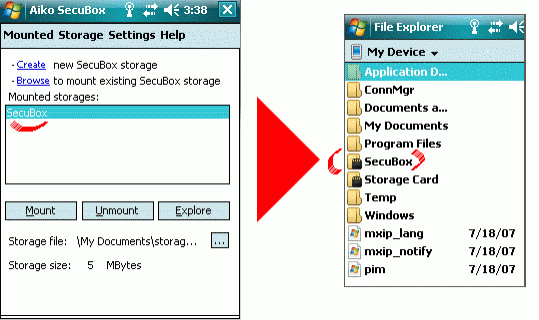
Encryption software for Windows Mobile PDAs and PDA memory cards. Creates a secure storage for all business documents and files - all protected with the strongest algorithm available today - AES 256 bit. Protects private data from getting into wrong hands even if the device is lost or stolen.
The encryption software creates a virtual storage card on the Windows Mobile PDA. Data moved to and from the virtual storage card is encrypted or decrypted on-the-fly using the 256-bit AES algorithm. Decryption and encryption is totally transparent and requires no action from the user. It transforms your PDA in a highly secure device, requiring mininum effort and user interaction.
Features:
- Strong and unbreakable AES 256-bit encryption
- Encryption key backup
- File Erasing mechanisms compliant with the US Department of Defense specifications (U.S. DoD 5220.22-M)
- Windows Mobile File Explorer integration
- Ability to customise program behaviour - autotun, command line support, etc.
- Password quality meter
- Up to 10 encrypted storage cards supported
- No backdoors
About SecuBox for Pocket PC
This Encryption Tools program is available in English, Japanese. It was last updated on 29 September, 2026. SecuBox for Pocket PC is compatible with the following operating systems: Other, Windows, Windows-mobile.
The company that develops SecuBox for Pocket PC is Aiko Solutions. The latest version released by its developer is 1.3.1. This version was rated by 1 users of our site and has an average rating of 3.0.
The download we have available for SecuBox for Pocket PC has a file size of N/A. Just click the green Download button above to start the downloading process. The program is listed on our website since 2007-10-08 and was downloaded 143 times. We have already checked if the download link is safe, however for your own protection we recommend that you scan the downloaded software with your antivirus. Your antivirus may detect the SecuBox for Pocket PC as malware if the download link is broken.
How to install SecuBox for Pocket PC on your Windows device:
- Click on the Download button on our website. This will start the download from the website of the developer.
- Once the SecuBox for Pocket PC is downloaded click on it to start the setup process (assuming you are on a desktop computer).
- When the installation is finished you should be able to see and run the program.
Program Details
System requirements
Download information
Pricing
Version History
version 1.4.2
posted on 2008-02-04
driver update
version 1.3.1
posted on 2007-10-08
SecuBox 1.3 offers secure data wiping, automatic launch and numerous enhancements that make data protection easy and painless!
